搜索
工艺
理论
配色
案例
思维
重新
经验
分享
外观
理论
结构
模具
硬件
管理
手机
智能
电脑
电器
数码
通讯
交航
家居
穿戴
医美
设备
工具
卡通
开启左侧

[代码编程] python Streamlit AI应用开发-界面-笔记

[复制链接]
admin 发表于 2026-1-20 09:57:42 | 显示全部楼层 |阅读模式
购买主题 本主题需向作者支付 30 金币 才能浏览
 楼主| admin 发表于 2026-1-20 13:31:20 | 显示全部楼层
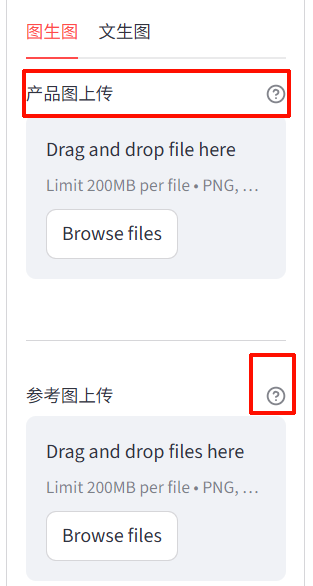
label_visibility="visible",     显示标签名与help内容
label_visibility="collapsed"隐藏标签

image.png

  1.     base_file = st.file_uploader(
  2.                         "产品图上传",
  3.                         type=["png", "jpg", "jpeg"],
  4.                         key="hidden_base",            
  5.                         label_visibility="visible",
  6.                         help="推荐PNG,JPG,JPEG,不推荐webp,gif"
  7.                     )
复制代码

 楼主| admin 发表于 2026-1-20 14:13:14 | 显示全部楼层
针对 Streamlit 1.58 可以隐藏文件上传列表的解决方案


# 在创建文件上传组件后立即应用CSS,  


  1. # ===================== 第二列:参数设置 =====================
  2. with param_col:
  3.     with st.container(border=True, height=820):
  4.         st.markdown("**⚙️ 参数设置**")
  5.         left_col, right_col = st.columns([2, 3])

  6.         # -------- 左侧:图生图 / 文生图 --------
  7.         with left_col:
  8.             with st.container(border=True, height=745):
  9.                 tab1, tab2 = st.tabs(["图生图", "文生图"])

  10.                 # ===== 图生图 =====
  11.                 with tab1:
  12.                     # 首先,添加 CSS 样式来隐藏文件列表
  13.                     st.markdown("""
  14.                     <style>
  15.                     /* 隐藏最近创建的文件上传组件的文件列表 */
  16.                     div[data-testid="stFileUploader"]:has(input[type="file"]) > div:last-child {
  17.                         display: none !important;
  18.                     }
  19.                     </style>
  20.                     """, unsafe_allow_html=True)
  21.                     # ⭐ 底图上传控件
  22.                     base_file = st.file_uploader(
  23.                         "产品图上传",
  24.                         type=["png", "jpg", "jpeg", "webp", "bmp", "tiff"],
  25.                         key="hidden_base",            
  26.                         label_visibility="visible",
  27.                         help="推荐PNG,JPG,JPEG,不推荐webp,gif",
  28.                        
  29.                     )

  30.                     # ⭐ 保存到 session_state
  31.                     if base_file:
  32.                         st.session_state.base_image = base_file

  33.                     # ⭐ 上传后显示底图,宽度固定100px,点击放大
  34.                     if st.session_state.base_image:
  35.                         img_bytes = st.session_state.base_image.getvalue()
  36.                         img_base64 = base64.b64encode(img_bytes).decode()

  37.                         st.markdown(f"""
  38.                             <img
  39.                                 src="data:image/png;base64,{img_base64}"
  40.                                 style="width:100px; object-fit:contain; cursor:pointer;"
  41.                                 onclick="showPreview(this.src)"
  42.                             />
  43.                         """, unsafe_allow_html=True)

  44.                         # ⭐ 删除底图按钮(兼容新旧版本)
  45.                         if st.button("删除底图", key="del_base"):
  46.                             st.session_state.base_image = None
  47.                             # 适配 Streamlit 版本:1.28+ 用 st.rerun(),低版本用 st.experimental_rerun()
  48.                             try:
  49.                                 st.rerun()
  50.                             except AttributeError:
  51.                                 st.experimental_rerun()

  52.                     st.divider()

  53.                     # ===== 参考图上传=====
  54.                     ref_files = st.file_uploader(
  55.                         "参考图上传",
  56.                         type=["png", "jpg", "jpeg", "webp", "bmp", "tiff"],
  57.                         accept_multiple_files=True,
  58.                         key="ref_uploader",
  59.                         label_visibility="visible",
  60.                         help="推荐PNG,JPG,JPEG,不推荐webp,gif"
  61.                     )
  62.                     
  63.                     # ⭐ 处理参考图上传(去重 + 限制数量)
  64.                     if ref_files:
  65.                         for f in ref_files:
  66.                             if len(st.session_state.ref_images) >= 9:
  67.                                 st.warning("最多只能上传9张参考图!")
  68.                                 break
  69.                             # 文件去重(MD5哈希)
  70.                             file_hash = hashlib.md5(f.getvalue()).hexdigest()
  71.                             exists = any(x.get("hash") == file_hash for x in st.session_state.ref_images)
  72.                             if not exists:
  73.                                 st.session_state.ref_images.append({
  74.                                     "id": str(uuid.uuid4()),
  75.                                     "file": f,
  76.                                     "hash": file_hash
  77.                                 })

  78.                     # ⭐ 参考图缩略图显示 + 删除逻辑(每行3张)
  79.                     if st.session_state.ref_images:
  80.                         cols = st.columns(3)
  81.                         delete_id = None
  82.                         clear_all = False

  83.                         for idx, img in enumerate(st.session_state.ref_images):
  84.                             with cols[idx % 3]:
  85.                                 # 生成图片Base64
  86.                                 img_base64 = base64.b64encode(img["file"].getvalue()).decode()
  87.                                 # 显示图片(点击放大)
  88.                                 st.markdown(f"""
  89.                                     <img
  90.                                         src="data:image/png;base64,{img_base64}"
  91.                                         style="width:120px; max-height:160px; object-fit:contain; cursor:pointer;"
  92.                                         onclick="showPreview(this.src)"
  93.                                     />
  94.                                 """, unsafe_allow_html=True)
  95.                                 # 单个删除按钮(唯一key)
  96.                                 if st.button("🗑 删除", key=f"del_ref_{img['id']}", use_container_width=True):
  97.                                     delete_id = img["id"]

  98.                         # 清空所有参考图按钮
  99.                         if st.button("清空所有参考图", key="clear_all_ref", use_container_width=True):
  100.                             clear_all = True

  101.                         # ⭐ 执行删除/清空操作(立即刷新)
  102.                         if delete_id or clear_all:
  103.                             if clear_all:
  104.                                 st.session_state.ref_images.clear()
  105.                             else:
  106.                                 st.session_state.ref_images = [x for x in st.session_state.ref_images if x["id"] != delete_id]
  107.                             # 适配 Streamlit 版本
  108.                             try:
  109.                                 st.rerun()
  110.                             except AttributeError:
  111.                                 st.experimental_rerun()
复制代码


 楼主| admin 发表于 2026-1-20 14:16:33 | 显示全部楼层
上传图片后,没有文件列表,并可删随便文件的方法

如果不想要文件名:
  • 移除文件名显示:
    • 删除了 <small style="color: #666; margin-top: 4px;">{st.session_state.base_image.name}</small> 部分
    • 只保留图片元素,保持居中显示


  1. # ===================== 在整个应用顶部初始化session_state =====================
  2. if 'base_image' not in st.session_state:
  3.     st.session_state.base_image = None
  4. if 'base_uploader_key' not in st.session_state:
  5.     st.session_state.base_uploader_key = 0

  6. # ===================== 第二列:参数设置 =====================
  7. with param_col:
  8.     with st.container(border=True, height=820):
  9.         st.markdown("**⚙️ 参数设置**")
  10.         left_col, right_col = st.columns([2, 3])

  11.         # -------- 左侧:图生图 / 文生图 --------
  12.         with left_col:
  13.             with st.container(border=True, height=745):
  14.                 tab1, tab2 = st.tabs(["图生图", "文生图"])

  15.                 # ===== 图生图 =====
  16.                 with tab1:
  17.                     # ⭐ 关键CSS:只隐藏视觉元素,保留功能
  18.                     st.markdown("""
  19.                     <style>
  20.                     /* 隐藏文件列表的视觉元素,但保留功能 */
  21.                     div[data-testid="stFileUploader"] div[data-testid="stFileUploaderFileContainer"] > div:nth-child(2),
  22.                     div[data-testid="stFileUploader"] div[data-testid="stFileUploaderFileContainer"] > div:nth-child(3) {
  23.                         visibility: hidden !important;
  24.                         height: 0 !important;
  25.                         margin: 0 !important;
  26.                         padding: 0 !important;
  27.                     }
  28.                     
  29.                     /* 隐藏进度条和额外空间 */
  30.                     div[data-testid="stFileUploader"] div[role="progressbar"],
  31.                     div[data-testid="stFileUploader"] > div:last-child div {
  32.                         visibility: hidden !important;
  33.                         height: 0 !important;
  34.                     }
  35.                     
  36.                     /* 减小上传区域高度 */
  37.                     div[data-testid="stFileUploader"] div[data-testid="stFileUploaderDropzone"] {
  38.                         min-height: 60px !important;
  39.                         padding: 5px 10px !important;
  40.                     }
  41.                     </style>
  42.                     """, unsafe_allow_html=True)
  43.                     
  44.                     # ⭐ 增强型底图上传控件 - 每次删除后重置key
  45.                     base_file = st.file_uploader(
  46.                         "产品图上传",
  47.                         type=["png", "jpg", "jpeg", "webp", "bmp", "tiff"],
  48.                         key=f"hidden_base_{st.session_state.base_uploader_key}",            
  49.                         label_visibility="visible",
  50.                         help="推荐PNG,JPG,JPEG,不推荐webp,gif",
  51.                     )

  52.                     # ⭐ 智能处理文件上传
  53.                     if base_file:
  54.                         # 仅当新文件与当前文件不同时才更新
  55.                         if not st.session_state.base_image or base_file.name != st.session_state.base_image.name:
  56.                             st.session_state.base_image = base_file
  57.                             st.rerun()  # 立即刷新显示新上传的图片

  58.                     # ⭐ 上传后显示底图
  59.                     if st.session_state.base_image:
  60.                         img_bytes = st.session_state.base_image.getvalue()
  61.                         img_base64 = base64.b64encode(img_bytes).decode()

  62.                         st.markdown(f"""
  63.                             <div style="display: flex; flex-direction: column; align-items: center; margin: 10px 0;">
  64.                                 <img
  65.                                     src="data:image/png;base64,{img_base64}"
  66.                                     style="width:100px; height:100px; object-fit:contain; cursor:pointer; border: 1px solid #ddd; border-radius: 4px; padding: 2px;"
  67.                                     onclick="showPreview(this.src)"
  68.                                     title="{st.session_state.base_image.name}"
  69.                                 />
  70.                                 <small style="color: #666; margin-top: 4px;">{st.session_state.base_image.name}</small>
  71.                             </div>
  72.                         """, unsafe_allow_html=True)

  73.                         # ⭐ 改进的删除底图按钮 - 完全重置上传状态
  74.                         if st.button("🗑️ 删除底图", key="del_base", use_container_width=True):
  75.                             st.session_state.base_image = None
  76.                             # 关键:增加key值强制重置上传组件
  77.                             st.session_state.base_uploader_key += 1
  78.                             st.rerun()  # 立即刷新

  79.                     st.divider()
  80.                     
  81.                     # ===== 参考图上传部分保持不变 =====
  82.                     # [您的参考图上传代码保持不变...]
复制代码


您需要登录后才可以回帖 登录 | 立即注册

本版积分规则

Copyright © 2006-2034 精研社
粤ICP备2021041072号-2   Powered by 精远产品设计 Licensed
快速回复 返回顶部 返回列表